

License Renewal
The OpenLegacy Platform requires a valid license to enable platform services and applications. If a license expires, access to certain platform capabilities may be restricted until a new license is applied. This guide explains how to renew the platform license after expiration.
Overview
The OpenLegacy Platform uses two license types to control platform usage and quotas:
| License type | What it controls | Scope |
|---|---|---|
| Master License | Overall platform entitlement - enables the platform itself | Platform-wide |
| Project Tag License | The number of published methods and legacy assets (RPCs or Screens) that can run under each project | Per project tag |
A Project Tag License counts the published methods and the legacy assets they expose. A service starts successfully only if a valid Project Tag license key is configured.
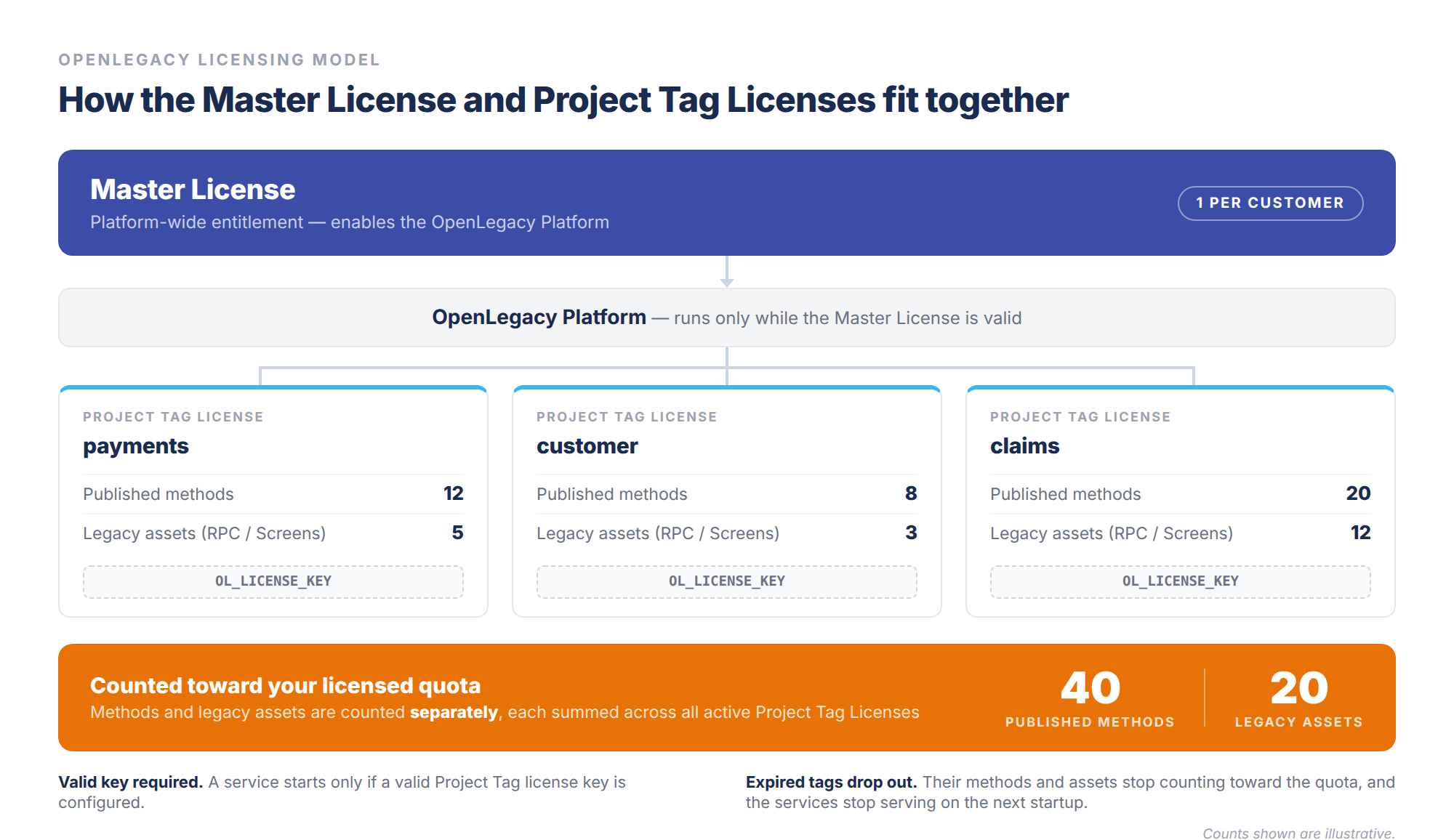
The renewal process differs slightly between SaaS and Enterprise deployments, as described below.
Master License Renewal
SaaS Edition
The Master License is extended automatically by the OpenLegacy Backoffice when the license is renewed.
No action is required from administrators.
Enterprise Edition
The Master License must be installed manually. After renewal:
- OpenLegacy Support sends the updated Master License to the administrator.
- The administrator uploads or configures the new Master License in the platform.
Project Tag License Renewal
Project Tag Licenses control the number of published methods and legacy assets (RPCs or Screens) allowed. When licenses are renewed:
- The platform prompts administrators to update the Project Tag license key.
- The new key must be applied to the running services.
Updating Project Tag License Keys
Step 1 - Extend the license in the OL Hub Integration License Portal
- Open the OL Hub Integration License Portal.
- Locate the relevant Project Tag license and extend it.
- Copy the updated license key.
Step 2 - Update the service configuration
The Admin or DevOps engineer updates the license key used by the service. Depending on the deployment, update either:
- Environment variables
OL_LICENSE_KEY=<updated-license-key>- Service configuration files (e.g.,
application.yaml)
ol.license.key: <updated-license-key>Step 3 - Restart the services
Restart the affected services and confirm that they start successfully. The updated license is then applied.
Services continue running on the previous license until they are restarted. Plan a restart window as part of the renewal.
Behavior of Expired Project Tags
If a Project Tag License expires and is not renewed:
- The published methods and legacy assets under that license no longer count toward the licensed quota.
- The services using that license stop serving on the next startup.
This lets organizations reduce their licensed capacity when fewer published methods or legacy assets are needed in the next licensing period.
Example
Your license covered 100 published methods and legacy assets last year, but only 60 are needed next year:
- Renew only the Project Tag licenses covering the 60 you still need.
- The remaining 40 do not count toward your quota.
Renewal Requirement
A license cannot be renewed unless the corresponding Project Tag exists.
Best Practice
Renew only the Project Tag Licenses required for the upcoming licensing period.
- If certain published methods or legacy assets are no longer needed, do not renew their Project Tag licenses.
- Unrenewed licenses do not count toward your quota.
This keeps license usage aligned with actual usage of published methods and legacy assets.
Updated 2 months ago