

Spring Java Kafka Generator
Generate Kafka Consumers
This generator enables the deployment of your OpenLegacy Hub project as an Apache Kafka service in a Java runtime environment. The output is a low-code Spring Boot project, which mirrors the contract of the generated Hub project. Each method within the Hub project is transformed into a Kafka consumer, responsible for processing messages from a Kafka Topic and executing the associated logic.
Once deployed and running, to incorporate the latest changes from the Hub project—such as newly added methods, removed methods, or modifications to input/output fields—simply stop and restart the service.
For projects utilizing the OPZ provider, ensure the OPZ file is updated with the new version before restarting the service to reflect the changes
Consumer Client Configurations
Navigate to your project's contract - click the three dots and select Configure Kafka
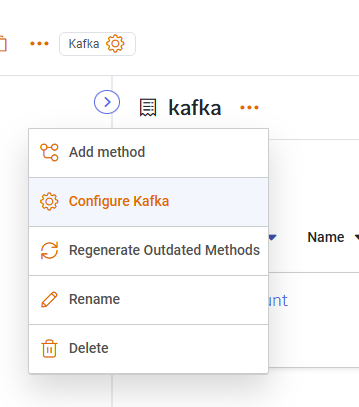
You will see the following window:
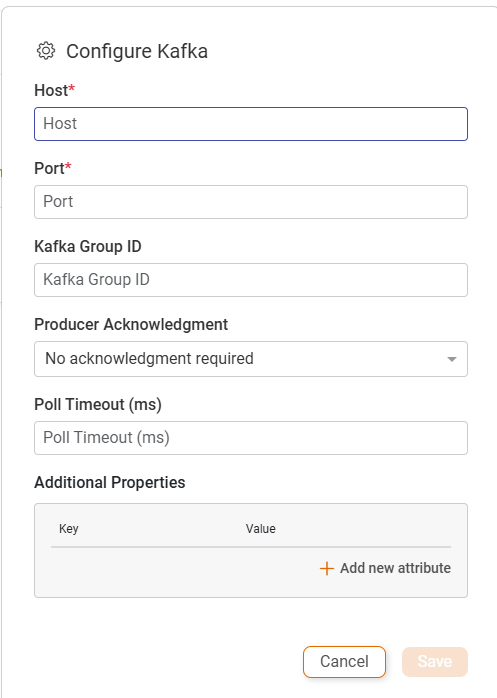
This window shows the Kafka Client properties you can set from the project contract:
- Host: The Kafka host address.
- Port: The Kafka host port.
- Kafka Group ID: The group.id is the string identifier that tells Kafka which consumer group a given consumer belongs to.
- Producer Acknowledgment: Kafka producer acknowledgments are controlled by the acks setting and define when the producer considers a send “successful” based on what the brokers confirm.
- No acknowledgment required:
acks=0Producer does not wait for any response. - Leader only acknowledgment:
acks=1Producer waits for the leader broker to write the record and acknowledge. - All in-sync replicas acknowledgment:
acks=all(or -1) Producer waits until the leader and all in‑sync replicas have written the record.
- No acknowledgment required:
- Poll Timeout: controls how long the call will block while waiting for records.
- Additional Properties: allows the user to add any Kafka client property following a key-value approach. You can find client properties in here Consumer Properties
Consumer Configuration inside the method:
Navigate to your method in the contract - click the three dots and select Configure Kafka
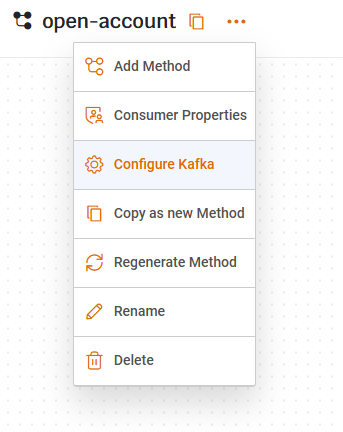
You will see the following window:
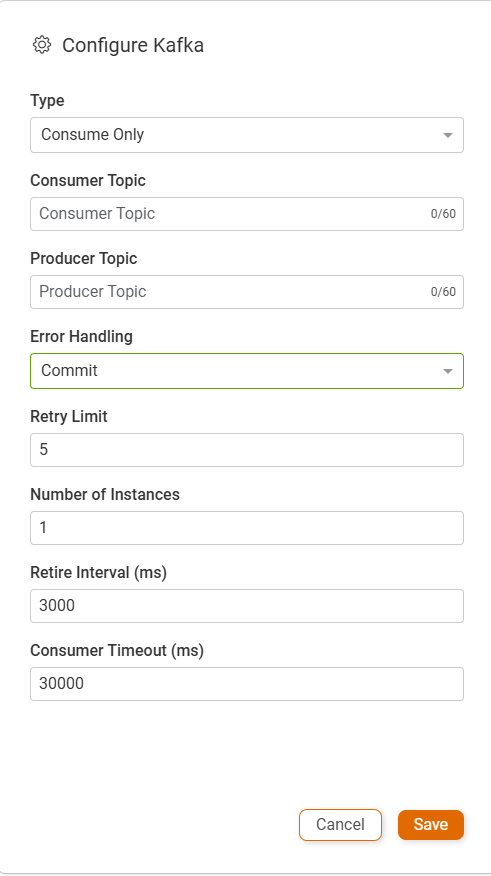
This window shows the Kafka topic properties you can set from the project contract:
- Type:
- Consume Only: - Retrieves a message from the Consumer Topic and executes the flow logic.
- Consume Produce - Retrieves a message from the Consumer Topic, processes it, and publishes the result to the Producer Topic.
- Consumer Topic: The Kafka Topic from which messages are consumed.
- Producer Topic: The Kafka Topic where processed output messages are published.
- Error Handling: Defines the behavior when message processing fails.
- Commit: No action. The consumer proceeds to the next message.
- No Commit: Retries the message a few times before failing the consumer if the retries are unsuccessful.
- Dead Letter Queue (DLQ): Moves the failed message to a designated error Topic (DLQ) and continues to the next message.
- Dead Letter Queue (DLQ): If DLQ is selected in the error handling strategy, specify the Kafka Topic for error messages here.
- Retry Limit: The amount of time the API will try to process the consumer message before failing.
- Retry Interval: The amount of time the API will wait between each retry.
- Consumer Timeout: The amount of time the API will try to process the message before failing. The default value is 30 seconds.
Updated 6 months ago