

IMS-DB Connector
Overview
IMS DB (Information Management System Database Manager) is a high-performance hierarchical database management system (DBMS) developed by IBM.
The OpenLegacy IMS DB connector allows you to automatically generate a custom invoker for SQL prepared statements by providing a small set of configuration settings. The connector can either analyze the structure of a provided prepared statement or execute it and analyze the returned result set, which is especially useful for complex queries.
Connection Properties
url
urlA JDBC-formatted URL of the database.
username / password
username / passwordA valid database username and its corresponding password.
connectionTestQuery
connectionTestQueryA lightweight query that returns quickly and is used to verify connectivity to the database.
queryTimeout
queryTimeoutThe maximum number of milliseconds the connection will wait for a database response before throwing a timeout exception.
Pool – connection pool parameters
poolMaxSize– The maximum number of connections allowed in the pool.poolIdleTimeout– The number of milliseconds a connection may remain idle before being terminated.poolMinimumIdle– The minimum number of idle connections the pool maintains, provided the total number of connections does not exceedpoolMaxSize.poolMaxLifetime– The maximum amount of time (in milliseconds) a connection is allowed to remain in the pool before being closed and removed, regardless of whether it is idle.
Adding an Asset
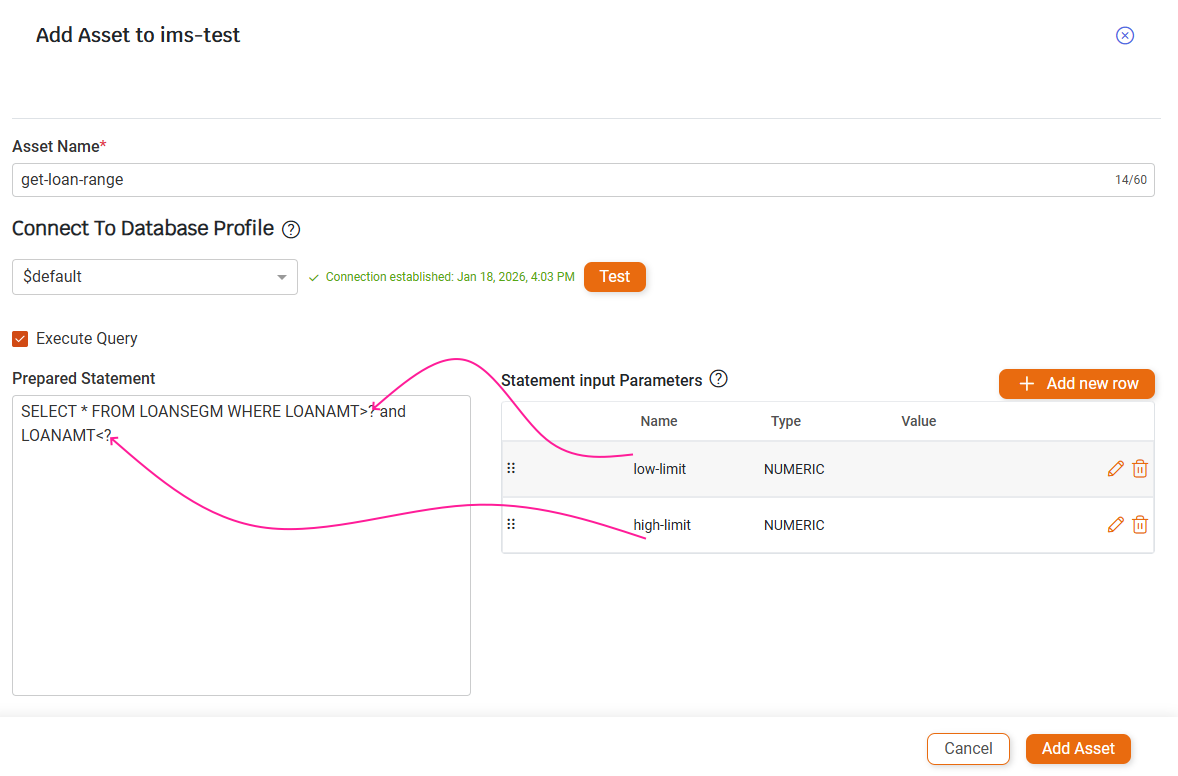
Assets can be added to an IMS DB module by providing a prepared statement that uses ? placeholders instead of hard-coded values. For each placeholder, a corresponding Statement Input Parameter must be defined.
There must be a one-to-one correlation between placeholders and input parameters: the first input parameter replaces the first placeholder, the second replaces the second placeholder, and so on.
Creating an Asset:
- Navigate To you IMS-DB module
- Click the Add Asset Button
- Name the Asset
- Test the connection
- Enter your Prepared statement
- For each placeholder '?' in your statement create a corresponding input parameter
- Name the parameter however you like
- The order of the input parameters matter - the first input will be mapped to the first placeholder , the second input will be mapped to the second placeholder and so on.
- Click the Add Asset button
Example:
Binary Data
Computational fields are stored in binary form in the database. By default, any binary column is mapped in the asset as a packed decimal field. This means that at runtime, the connector will attempt to deserialize the binary data in the column using the COMP-3 format, as it is the most commonly used representation.
Limitations
- At this time, IMS DB can retrieve structures only from tables that are registered in the IMS DB catalog.
Updated 9 months ago